 ozan
5b30c6b705
ozan
5b30c6b705
Personal AI station post: DeepSeek DJ, Lyria 3, curation metadata, and Gitea auto-play gateway.

Co-authored-by: Cursor <cursoragent@cursor.com>
4.8 KiB
title, slug, date, description, og_description, og_image, excerpt, author, author_initials, author_role
| title | slug | date | description | og_description | og_image | excerpt | author | author_initials | author_role |
|---|---|---|---|---|---|---|---|---|---|
| Live Ozan Radio: A Personal AI Station in Cursor | live-ozan-radio | 2026-06-07 | No Spotify playback — DeepSeek DJs, Lyria composes, and every track gets curated metadata. How we built a personal radio that auto-plays from our own Gitea. | Personal AI radio: DeepSeek DJ + Lyria 3, taste from screenshots, auto-play on tinqs.com. | https://tinqs.com/tinqs/blog/media/branch/main/img/live-ozan-radio-workspace.png | I wanted a radio that never plays catalog music — only fresh AI compositions shaped by my taste. Here's the stack, the player, and how I DJ every generated track with metadata. | Ozan Bozkurt | OB | CTO & Developer, Tinqs |
I do not want a playlist. I want a station — something that feels like late-night desert dub and Anadolu psych drifting out of a speaker, but every track is composed fresh, never pulled from Spotify or Apple Music. So we built Live Ozan Radio: DeepSeek as the on-air DJ, Google Lyria 3 as the music engine, and our own Gitea instance as the host.
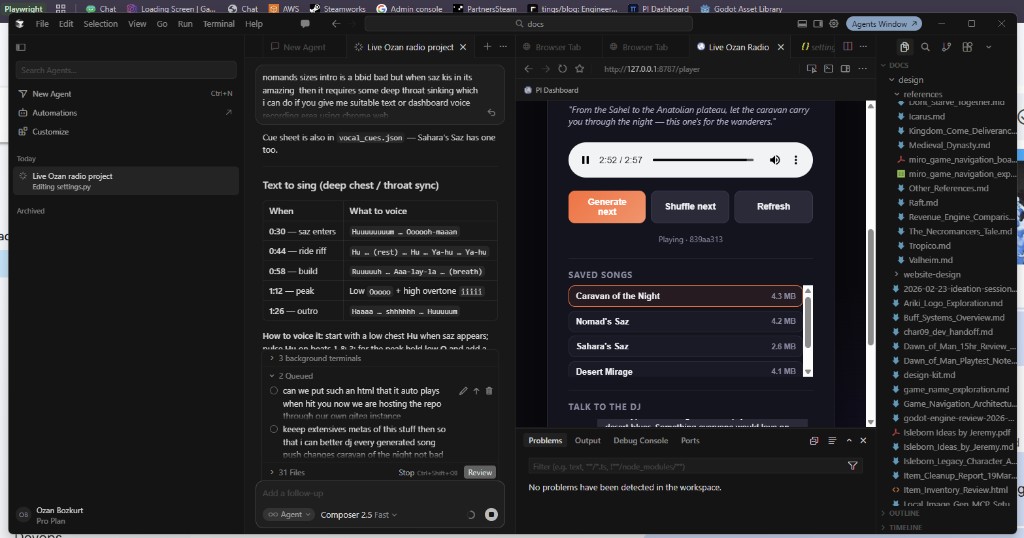
That screenshot is how I actually use it: Cursor on the left with taste notes and vocal cues, the local player on :8787 on the right, saved songs in a scrollable library, and a chat box to steer the next generation. It is dogfooding in the truest sense — we run our game studio on the same Gitea fork we sell as Tinqs Studio, and the radio lives in that repo too.
No catalog, ever
The rule is simple: nothing pre-recorded from the outside world. Every MP3 is generated by Lyria from a prompt that DeepSeek writes using settings.json (taste profile) and taste_seeds.json (built from Spotify screenshots in Cursor — no Spotify API). Shuffle mode mixes saved tracks with new compositions until the daily cap hits.
The stack:
| Layer | What it does |
|---|---|
| DeepSeek | DJ brain — mood, Lyria prompts, chat |
| Lyria 3 Pro | Full songs (~1–2 min), vocals optional |
| FastAPI player | Stream, library, cost dashboard, vocal booth |
| Git LFS | Committed songs + rich metadata |
Curating every generation like a real DJ
Raw MP3s are not enough. Each track gets an extensive *.meta.json: rating (love / keeper / skip), what I loved, what I hated, clone_prompt_hints for successors, BPM, skip-intro timestamps, and instrument tags. A library_index.json rolls that up so the DJ knows, for example, that Sahara's Saz is the gold standard (saz + ney + sub bass by twenty seconds) and that fuzz electric guitar on vocal tracks is a hard avoid.
That metadata feeds back into every plan_next call. When I said Caravan of the Night was "not bad" but I hated the electric guitar bit, that went into disliked and avoid_in_successors — the next griot-vocal generation should keep the Sahel chants and drop the Tinariwen-style guitar.
Public auto-play on tinqs.com
The full dashboard (python -m ozan_radio serve → http://127.0.0.1:8787/player) needs the API for Lyria compose, settings, and chat. But listening-only is static: gateway/index.html in the repo embeds the playlist and auto-plays from Git LFS media URLs when you open it on Git Studio:
https://tinqs.com/tinqs/live-radio/src/branch/main/gateway/index.html
Commit, push, share the link — no server required for listeners. New tracks run export-web (or auto-export on save) to refresh the embedded playlist.
Vocal booth in the browser
For instrumentals where I want my own layer (deep chest / throat-sync over Nomad's Saz when the saz kicks in at ~0:30), the player includes a Chrome vocal booth: cue sheet with timestamps, skip-to-saz, MediaRecorder for takes, download as WebM. Lyria cannot remix an existing MP3 — but I can record over it locally while the track plays in headphones.
Lyria settings in the web UI
The player settings panel talks to /api/lyria and adapts from the real Gemini API: model (Pro vs 30s Clip), vocal mode (instrumental / mix / full vocals), lyric language, singer profile, WAV vs MP3. Changes persist to settings.json and shape both the Lyria suffix and the DJ system prompt.
Repo
Open source on our Gitea: https://tinqs.com/tinqs/live-radio
Clone, add your taste via Cursor + screenshots, run the server, or just hit the gateway link and let it shuffle. If you are building on Tinqs Studio, this is the kind of small, weird, personal tool that belongs in the same forge as your docs and your game — not on someone else's CDN.
Inspired by Google's Magenta RealTime 2 segment on AI Search — we wanted the Lyria full-song path first; optional live MRT2 layer on Apple Silicon is on the roadmap.